Snap the bill.
We'll keep the books.
Photograph a supplier invoice and it comes back as a coded double-entry draft — checked by your bookkeeper against the original, and posted only once they approve.
Free to start. PKR 25,000 a month for a full set of books.
Supplier, lines, tax and totals read from the page.
Android app
The scanner is already in your pocket
Your staff do not sit at the ledger. They stand at a counter, on a floor, at a gate where the delivery arrives. The app puts capture where the paper actually is — and the approval too, so a bill can go from the counter to the books without anyone opening a laptop.
- Photograph it where it landsCamera or an existing photo. It uploads and starts being read straight away.
- The right business, firstBusinesses are grouped by holding, because the same name can exist in two groups — and a receipt photographed into the wrong company is somebody’s afternoon to unpick.
- See what was readSupplier, date, tax and the summary, all on screen. The supplier comes from your real contact list, or gets added to it.
- Approve from the phoneNothing reaches the ledger until somebody taps Approve. If the photo was bad, retake it.
- It asks for the camera. Nothing else.Camera and photos, and the microphone permission is switched off deliberately — a bookkeeping app has no business listening.
Android, on phones and tablets. We set it up for the businesses we onboard — ask on the call and we will get it onto your team’s phones.
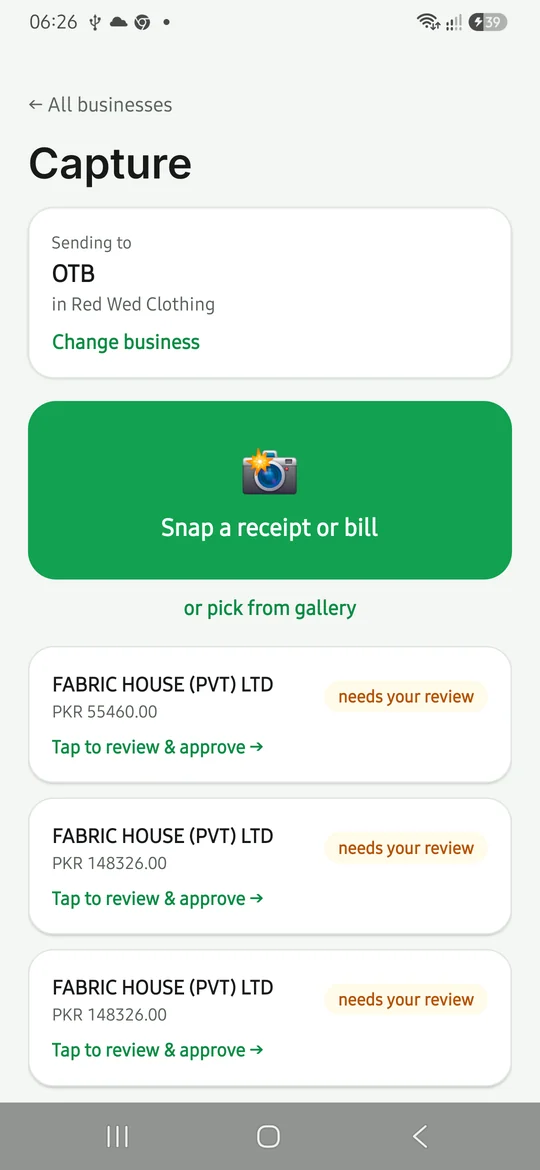
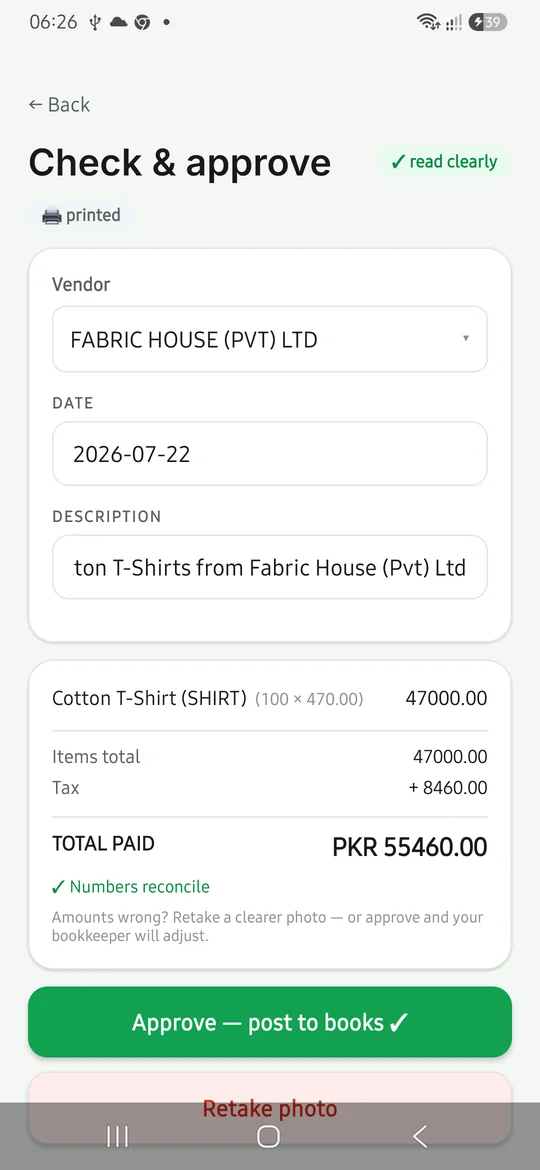
How it works
From a photograph to a posted entry
Reading the document is the only part that happens on its own. Everything after it is a person deciding.
1.Photograph it
Snap the bill on the counter — not at month end, when the ink has rubbed off and nobody remembers what it was for.
2.Check the draft
The entry opens with the original photograph beside it. Zoom in, compare it line for line, fix anything that is off.
Reversed rather than rewritten if it ever needs correcting.
3.Approve it
One click and it is in the ledger, both sides, with the document attached to it for whoever asks later.
Interface shown is illustrative. Figures on a live account are your own.

Why this is not the OCR bolt-on you have seen
Every system scans. Ours puts the document next to the entry.
A scanning add-on reads your bill and drops the result into a queue, on a different screen from the entry it just made. So somebody opens two windows and looks from one to the other.
- Side by side, on one screenEntry on the left, the photograph on the right. Zoom and drag to read the small print.
- It says when it is unsureWhere the read is uncertain the software says so and sends you to review, rather than posting and hoping.
- The paper stays attachedOpen any figure months later and the document behind it is right there.
What it covers
A whole business, on one ledger
Sell something and the stock, the cost of it and the customer's balance all move together — because they are the same transaction, not three of them typed into three places.
Every module, in detail → Sales and receivables
 Purchases and payables
 Inventory at weighted-average cost
 Production, BOM and work in progress
 Payroll and attendance
 Fixed assets and depreciation
 Bank reconciliation
 Multi-brand groups and shared costs
 P&L, balance sheet, cash flow, tax
 An Android app for capture and approval
Who it's for
Set up for how you actually trade
A manufacturer and an online seller both need double entry. They do not need the same costing, the same chart of accounts, or the same screens on day one.
Ecommerce sellers
Marketplace payouts checked against real cost of goods, so a good month on the platform dashboard is still a good month in the books.
Read more →Trading and distribution
Supplier bills, goods received in part or in full, and a receivables ledger that tells you who is actually late.
Read more →Manufacturing
Bills of material, materials issued to the floor, work in progress carried properly, and what the job really cost.
Read more →Groups and brands
Several brands with separate books, a consolidated view above them, and shared costs split by rule.
Read more →Doing something none of these quite describe? We build the difference.
Custom work
When the standard system does not fit
Businesses in a trade look alike until you get close. Then one of them costs a job in a way no template covers, or needs a document their customers have always had. We build that, rather than asking the business to change how it works to suit the software.
What we will not do is tell you the standard system already does it when it does not. You would find out in month two, and by then it is your problem rather than ours.
How custom work fits in →
Nothing posts without a person
Reading the document is all that happens automatically. Every capture arrives as a draft for somebody to approve, a posted entry is reversed rather than quietly rewritten, and a closed month stays closed.
See it read one of your own bills
Bring a bill you have not entered yet. We will scan it on the call and you can watch the entry appear.